

Introduction
AI systems are moving beyond simple chat interfaces. Developers now use agents that interact directly with tools, codebases, and runtime environments. A developer can ask an agent to review a repository, query documentation, run tests, and suggest fixes in a single workflow. The agent reasons about the task, selects the right capabilities, and invokes external tools to complete the work.
This ecosystem introduces several architectural components. Developers often encounter terms such as MCP, Agent Skills, Plugins, and instruction files like agents.md, claude.md, and cursor.md.
Each component controls a different part of the agent system, from reasoning to tool execution. This article explains how these layers connect and how modern AI agents operate inside real developer environments.
The Modern AI Agent Architecture
Modern AI agents operate as layered systems. Each layer handles a specific responsibility in the execution pipeline. The agent receives a request, reasons about the task, selects the required capabilities, and interacts with external systems through structured interfaces. This separation keeps reasoning, behavior control, and tool execution organized.
The architecture below shows the core layers that power most developer-focused agent systems.
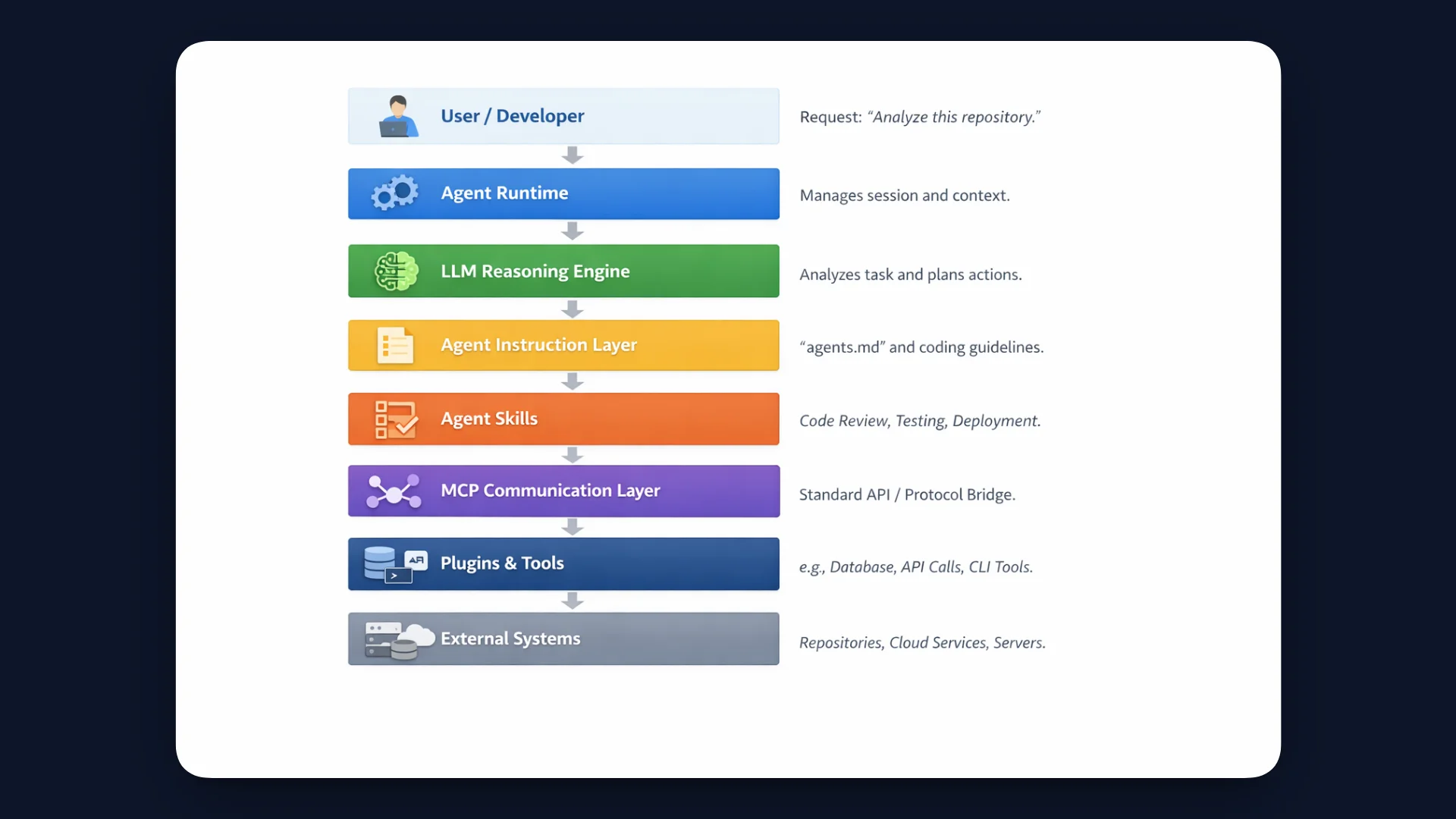
Below is a quick overview of what each layer represents.
| Layer | Role |
|---|---|
| User or Developer | The entry point of the system. A developer sends a request such as analyzing a repository, generating documentation, or fixing code. |
| Agent Runtime | Manages the agent session, loads context, and coordinates interaction between the model, skills, and tools. |
| LLM Reasoning Engine | Interprets the request, analyzes context, and decides what actions the agent should take. |
| Agent Instruction Layer | Instruction files such as agents.md, claude.md, or cursor.md that define behavior rules, coding guidelines, and environment context. |
| Agent Skills | Reusable capabilities that describe structured workflows such as repository analysis, code review, or deployment tasks. |
| MCP Communication Layer | The protocol layer that standardizes how the agent communicates with tools and external services. |
| Plugins and Tools | Executable integrations such as APIs, GitHub services, databases, terminals, or browser automation. |
| External Systems | The systems the agent interacts with, including repositories, documentation platforms, cloud services, and local environments. |
Together, these layers enable agents to move from reasoning to execution in a controlled workflow.
In the following sections, we will explore each layer in detail, starting with MCP, the communication layer that connects the agent to tools and external systems.
MCP (Model Context Protocol): The Communication Layer
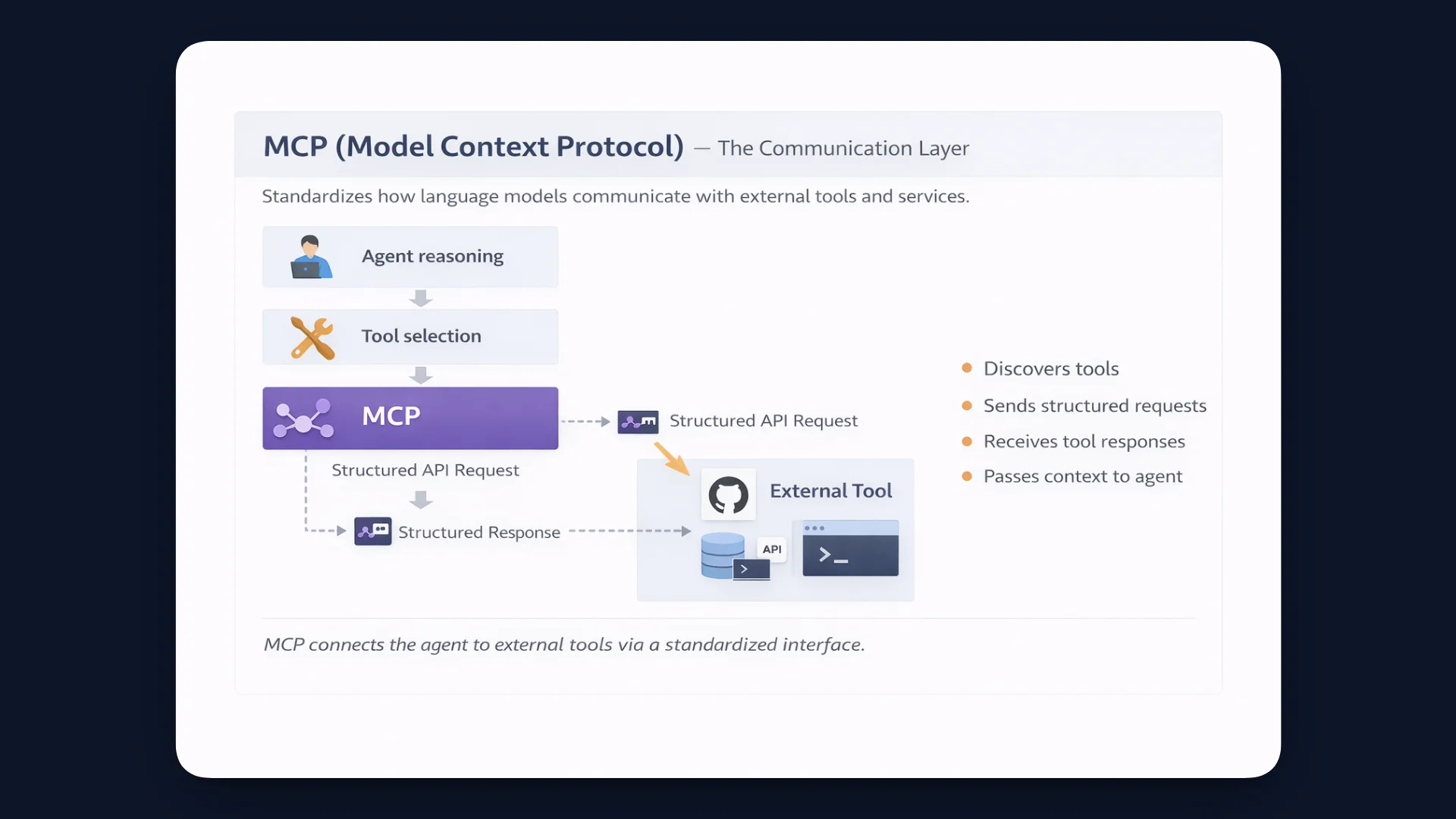
MCP is a protocol that standardizes how language models interact with external tools and services.
Instead of every AI system building custom integrations, MCP defines a common interface for tool discovery and execution.
Typical MCP responsibilities include:
- discovering available tools
- sending structured tool requests
- receiving tool responses
- passing context between systems
Example
A developer asks the agent to analyze a repository. The model decides it needs repository data. The agent selects a GitHub tool and sends a structured request through MCP to retrieve file contents or commit history. The tool executes the request and returns the results. The model then uses this data to continue reasoning and generate a response.
If the agent acts as the brain of the system, MCP functions as the communication protocol that connects the agent to external tools and services.
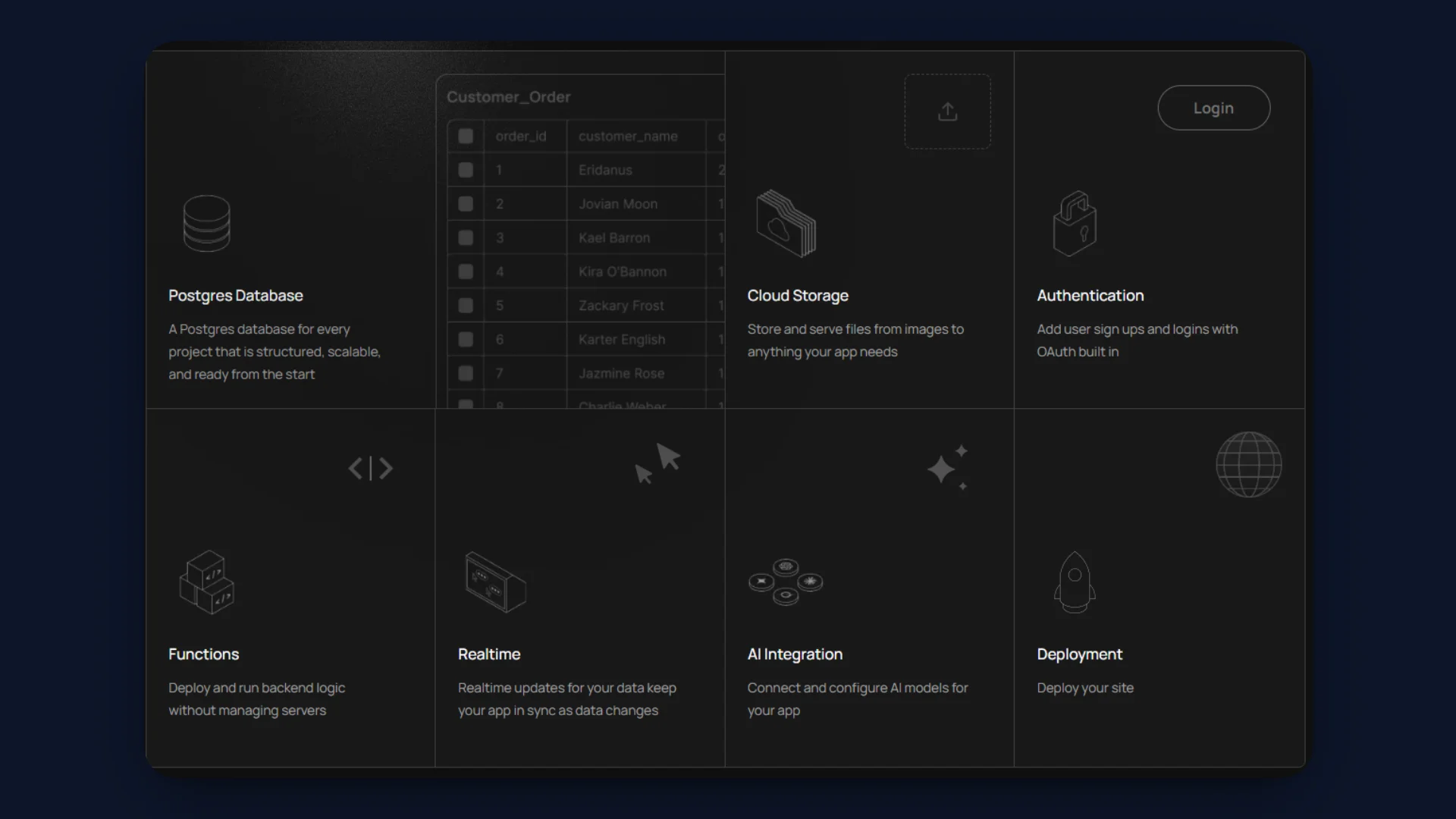
Platforms such as InsForge expose infrastructure services through MCP compatible interfaces, allowing agents to interact with databases, authentication systems, and storage through standardized tool calls.
Want to build quickly with your AI agent? Start Now!
Agent Skills: The Capability Layer
Skills represent higher-level workflows or abilities.
Examples include:
- code review
- documentation generation
- database analysis
- deployment automation
A skill usually contains three core elements:
- Instructions: Guidelines that explain the goal of the task and how the agent should approach it.
- Workflow steps: The sequence of actions the agent should follow during execution.
- Tool usage logic: The tools the agent should invoke to perform specific steps in the workflow.
Skill: Deploy Application
   ├ Tool: Build container
   ├ Tool: Push image
   └ Tool: Deploy to server
Example
A developer asks the agent to review a repository. The agent selects a code review skill. The skill defines the workflow: fetch repository files, analyze code patterns, check documentation, and inspect test coverage. During execution, the agent uses tools such as repository APIs or file readers to collect the required data.
A skill defines the capability, while tools perform the actions required to complete the task. Skills organize complex tasks into reusable workflows, which makes the agent system modular and easier to extend with new capabilities.
Platforms such as InsForge expose backend capabilities as reusable agent skills that agents can invoke during execution. These skills abstract common backend operations such as database queries, authentication flows, storage management, and service provisioning into structured workflows that agents can execute reliably.
Instead of manually defining every step, the agent can select a relevant skill and invoke it as part of the task pipeline. For example, an agent can trigger a database setup workflow, configure authentication, or access storage services directly through predefined skills exposed by the platform.
You can explore available skills and integration patterns in the InsForge documentation, and refer to the cookbooks to see how agents invoke these capabilities in real workflows.
Plugins and Tools: The Execution Layer
Plugins and tools perform the actual actions inside an agent system. While the model plans the task and skills define the workflow, tools execute the operations required to complete the request.
These tools usually connect the agent to external systems such as:
- APIs
- GitHub integrations
- databases
- terminal environments
- browser automation systems
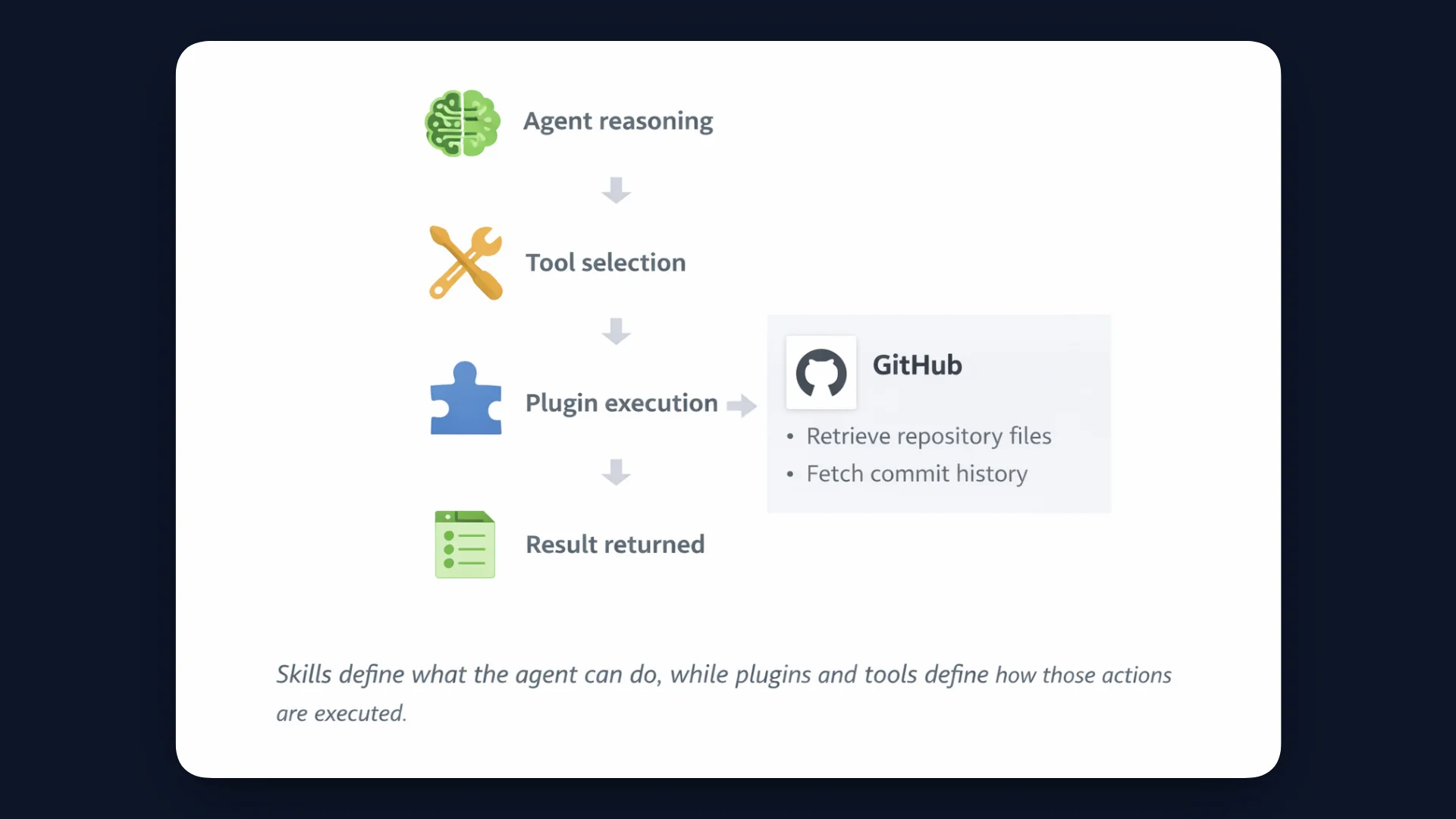
When the agent reaches a step that requires execution, it selects the required tool and sends the request through MCP. The tool operates and returns the result to the agent.
Example
In the previous section, the agent used a code review skill to analyze a repository. During that workflow, the agent needs access to repository files and commit history. The agent selects a GitHub integration tool and sends a request through MCP to retrieve repository data. The tool fetches the files and returns the results to the agent so the model can continue its analysis.
Skills define what the agent can do, while plugins and tools define how those actions are executed.
Agent Instruction Files (agents.md and Related Formats)
Agents need guidance about how they should operate inside a specific environment. Instruction files provide this guidance. They store rules and context that shape the behavior of the agent when it works with a repository or system.
These instruction files commonly appear as:
agents.md
claude.md
cursor.md
Each file defines structured instructions that the agent loads before reasoning begins. The instructions help the model understand how to interpret requests and how to operate within the project.
Typical instructions include:
- The role of the agent
- workflow rules
- coding guidelines
- tool usage constraints
- environment-specific behavior
Example
A repository may include an agents.md file that describes how the agent should review code. The file can specify that the agent should follow the project coding conventions, avoid modifying configuration files, and prioritize readability during refactoring tasks.
Example instructions inside the file may include:
Coding conventions
Architecture guidelines
Repository structure
Editing rules
Safety constraints
When the agent receives a request such as reviewing a repository, it loads these instructions before reasoning. This allows the agent to generate suggestions that align with the project rules and development practices.
Although the file names differ across tools, they represent the same concept. They provide structured instructions that guide how an AI agent operates within a system.
Instruction files shape the agent's decision process, while skills and tools execute the workflow.
End-to-End Agent Execution Flow
The previous sections described the individual layers of an agent system. These layers work together during task execution. The following example shows how a typical request moves through the system.
Example request
A developer asks the agent:
"Analyze this repository and suggest improvements."
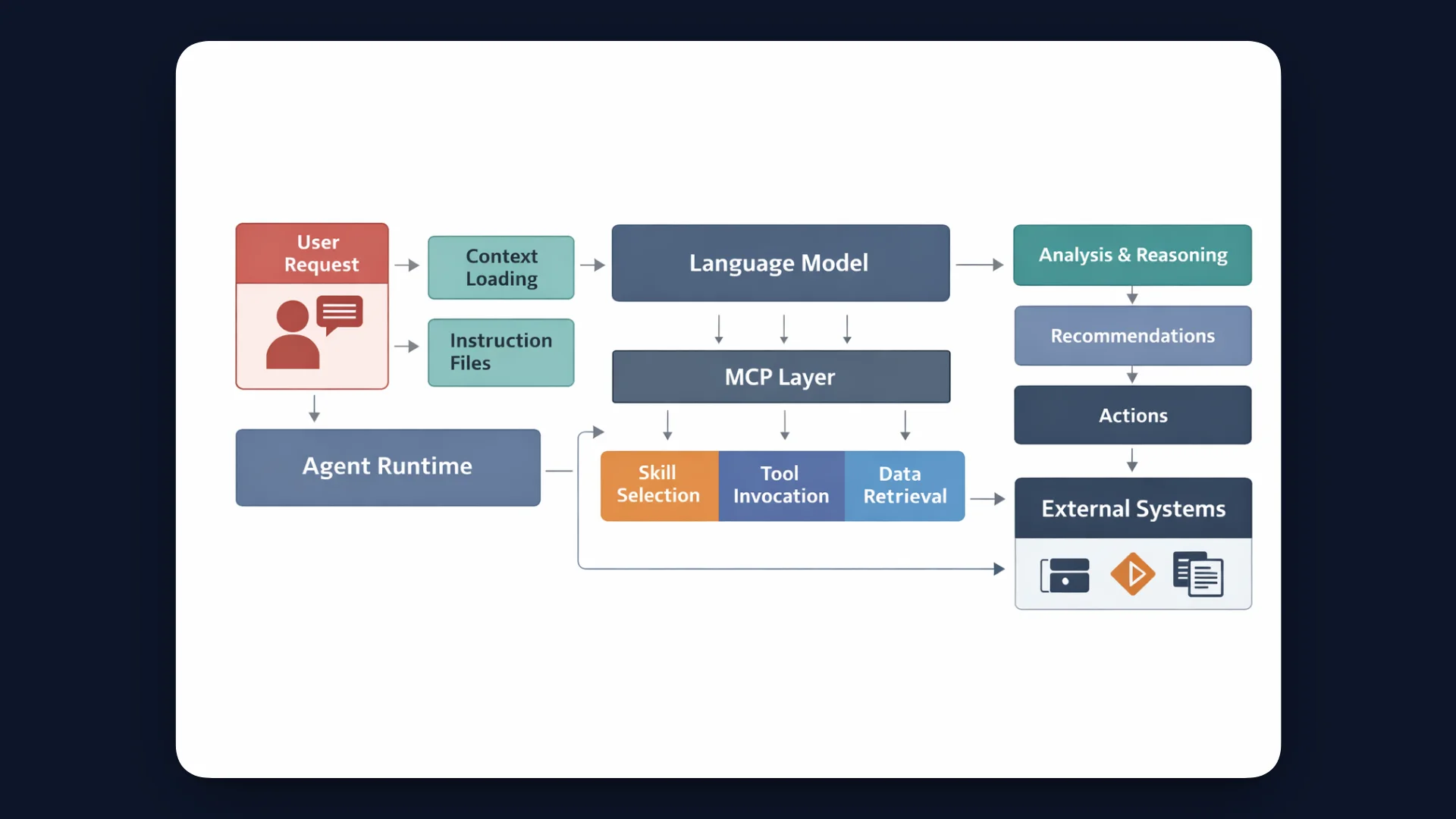
The agent processes the request through several steps.
First, the agent runtime receives the developer request and loads the working context. The language model analyzes the task and determines what actions are required before planning the response, the agent loads instruction files such as agents.md to understand repository rules and development guidelines.
The model then selects a relevant skill, such as repository analysis. The skill defines the workflow and invokes tools through MCP. These tools retrieve repository files, commit history, or documentation data. The results return to the model, which uses the information to generate recommendations.
The language model performs reasoning, while the surrounding architecture enables the agent to take action.
For example, an agent running on InsForge can analyze a repository, select a deployment skill, and invoke backend services through MCP connected tools. In a single workflow, the agent can provision databases with pgvector, configure realtime features, manage storage, and even deploy the application directly from one prompt.
Security and Control in Agent Architectures
Agent systems can access tools, repositories, and external services. This level of access introduces security risks if the agent executes unsafe instructions or interacts with sensitive systems without proper checks.
Common risks include:
- prompt injection
- unauthorized tool execution
- access to sensitive systems
- unintended code modifications
To reduce these risks, agent systems include control layers that limit how tools and actions are used.
Typical safeguards include:
- Permission systems: Define which tools or resources the agent can access.
- Tool restrictions: Limit actions such as file modification, deployments, or external API calls.
- Sandbox environments: Run agent operations in isolated environments to prevent system-level impact.
- Approval workflows: Require human confirmation before executing critical actions.
Why This Architecture Matters for Developers
This architecture gives developers a clear and scalable way to build and use AI agents inside real engineering environments.
Key benefits include:
- Modular systems: Agents separate reasoning, instructions, skills, and tools, which makes the system easier to design and extend.
- Reusable capabilities: Skills allow common workflows, such as code review or deployment to be reused across different tasks.
- Standardized tool communication: Protocols like MCP provide a consistent way for agents to interact with tools and external services.
- Scalable development workflows: Agents can assist with tasks such as repository analysis, documentation generation, and testing.
- Foundation for developer automation: This architecture supports AI coding assistants, automated workflows, DevOps support, and autonomous engineering tools.
Key Takeaways
Modern AI agents operate as layered systems that combine model reasoning with structured execution. Instruction files guide behavior, skills organize workflows, and MCP connects the agent to tools and external systems. This architecture allows agents to move beyond simple responses and perform real development tasks.
Understanding these layers helps developers design more reliable and controllable AI-driven systems.
InsForge provides an AI native backend built for coding agents, with services such as managed databases, authentication, storage, serverless functions, and AI integrations that agents can access through structured interfaces like MCP. This allows agents to provision backend resources, manage infrastructure, and deploy applications as part of the development workflow.